React SDK
Outdoor maps as React components
@mountaya/elements-react gives you the map, its controls, the elevation profile and the segment table as components. @mountaya/client-react adds the provider, the session hook and typed query hooks.
Works with the tools you already use


 Apple Health



 Other MCP clients
Challenges we solve
Put an outdoor map in your React app, with no renderer to wire.
One renderer, at one version
MapView builds the renderer and signs every tile request. MapLibre installs beside it, at the version its map worker is built from.
Sessions refresh before they expire
useSessionToken calls your minting endpoint ahead of expiry. Your users never see a request fail on a stale token.
Two elements that need no map
ItineraryProfile and ItinerarySegmentTable render with no canvas and no tile request. Put them in a dashboard, a sidebar or a print view.
Packages
What you install for React
Bindings that fetch, elements that draw, and the parts the editor is built from.
@mountaya/client-react
npm install @mountaya/client-react
@mountaya/elements-react
npm install @mountaya/elements-react @mountaya/elements @mountaya/client maplibre-gl@6.18.0
@mountaya/studio-react
npm install @mountaya/studio-react maplibre-gl@6.18.0
Map, profile and table
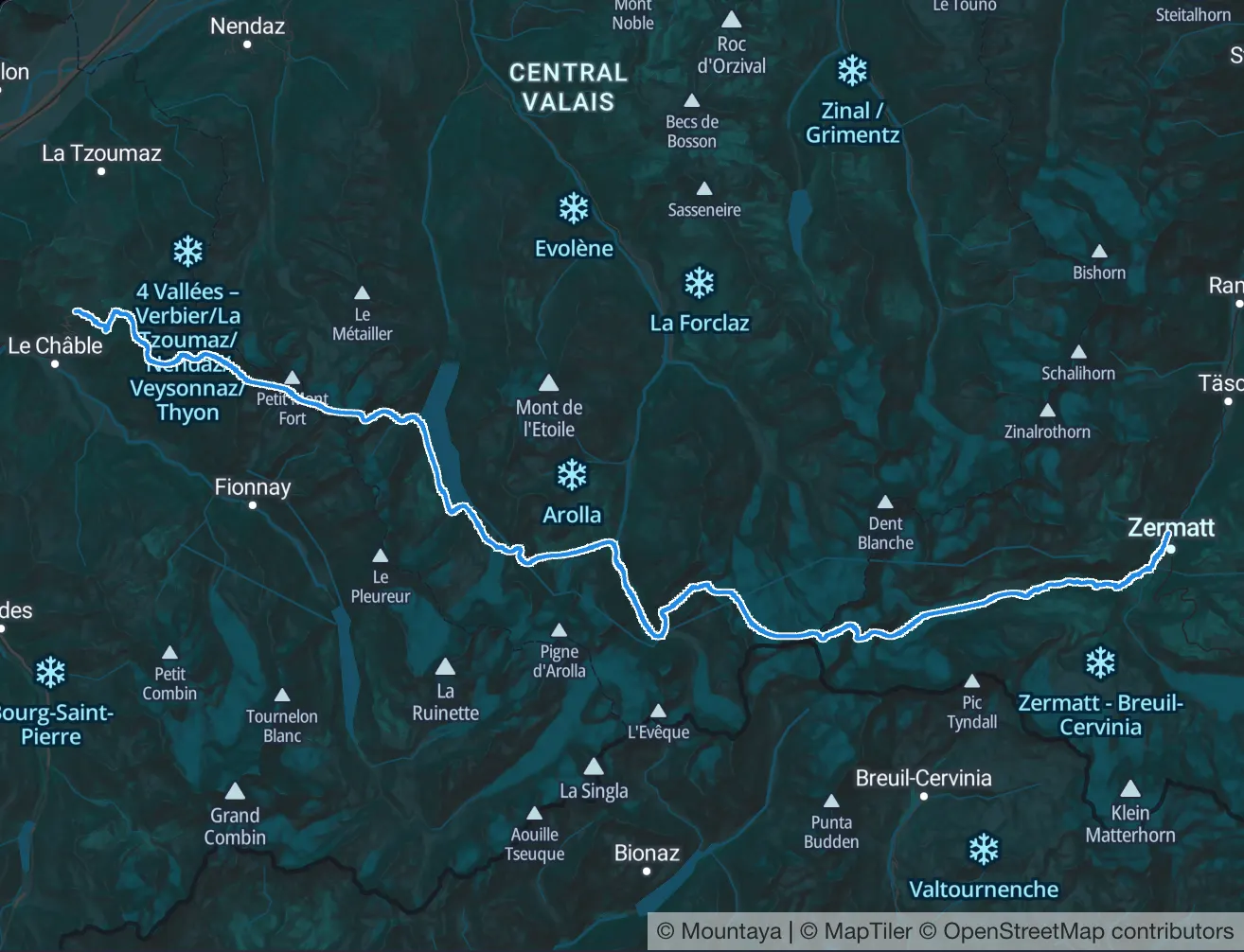
One course on the map, in a profile and in a table
The map, the Elevation Profile Element and the Segment Table Element read the same course, so pointing at one shows the same place in the other two. This one is the Patrouille des Glaciers, from Zermatt to Verbier.
Segment table of the Patrouille des Glaciers course, one row per segment from Zermatt to Verbier, each with its distance, climb, descent and altitude range.
- Distance
- 55.9 km
- Ascent
- 4,235 m
- Descent
- 4,365 m
- High point
- 3,643 m
The map follows the profile
Move along the profile and a card gives the distance, the altitude and the climb so far at that point. A marker follows on the map.
Waypoints on the profile
The course's waypoints are pinned on the profile at their own distance, and each segment is summed up underneath.
Each row lights its segment
Pointing at a row of the table lights that segment on the map. Pointing at the course on the map lights its row.
One set of figures
Each segment's distance and climb are computed once, on our servers, from the full track. The table, the profile and the map state the same numbers.
Integration
Install, authenticate, query, render
Provider, session hook, query hook, map. Each snippet carries its own imports and runs as written.
 React
Install
MapLibre installs beside the elements, at the exact version their map worker is built from.
npm install @mountaya/client @mountaya/client-react @mountaya/elements @mountaya/elements-react @tanstack/react-query maplibre-gl@6.18.0Authenticate
A publishable key is safe in a browser and is all the map needs. The Data API also takes a session token on every request, minted on your server from your secret key.
import { Mountaya } from "@mountaya/client/browser";
import { useSessionToken } from "@mountaya/client-react";
import { useState } from "react";

// Calls your endpoint and refreshes before expiry, not on a 401.
const { session } = useSessionToken({
  mint: () => fetch("/api/mountaya-session").then((r) => r.json()),
});

// One client for the component's life: a request waits for the first token,
// and a refresh reaches the next call and every map built on the client.
const [client] = useState(
  () => new Mountaya({ credential: { publishableKey, sessionToken: session } }),
);Call
Each operation is one typed method. The Data API is GraphQL, and the client writes the query for you.
import { isMountayaApiError } from "@mountaya/client";
import { useItinerary } from "@mountaya/client-react";

export const Itinerary = ({ itineraryId }: { itineraryId: string }) => {
  const { data, error, isPending } = useItinerary(itineraryId);

  if (isPending) return <Spinner />;
  if (error) {
    // The platform's own sentence where it answered; a timeout or a dropped connection has none.
    const message = isMountayaApiError(error) ? error.errors[0]?.message : error.message;
    return <ErrorBanner message={message} />;
  }

  return <h1>{data.name}</h1>;
};Render
Hand the client to the map and it signs its own tile requests.
import { Mountaya } from "@mountaya/client";
import type { MountayaMap } from "@mountaya/elements";
import { MapControls, MapView, MountayaElementsProvider } from "@mountaya/elements-react";
import { useState } from "react";
import "@mountaya/elements-react/styles.css"; // the one stylesheet: it carries the elements' own

const client = new Mountaya({ credential: { publishableKey: "pk_…" } });

export const Map = () => {
  const [map, setMap] = useState<MountayaMap | null>(null);

  return (
    <MountayaElementsProvider map={map}>
      <MapView center={[6.86, 45.83]} client={client} onReady={setMap} zoom={12} />
      <MapControls compass geolocate layers preferences zoom />
    </MountayaElementsProvider>
  );
};
What will you build with the SDKs & Elements?
Tell us what your product needs to draw. We show you the SDKs & Elements that draw it.
Frequently asked questions
@mountaya/client and @mountaya/client-react for data, @mountaya/elements and @mountaya/elements-react to draw. maplibre-gl installs beside them, at the exact version the elements' map worker is built from. Import one stylesheet, @mountaya/elements-react/styles.css: it already carries the renderer's styles and those of @mountaya/elements. TanStack Query backs the query hooks.
MapView and MapControls for the map, ItineraryProfile and ItinerarySegmentTable for the course, and MountayaElementsProvider to connect them. The client-react package adds a provider, a session hook and typed query hooks.
Yes. By default MapView builds and authenticates the renderer for you. Build the map instance yourself when you need to, and hand it in.
The API client runs in React Native today, so data, routing and terrain analysis work there. The rendering elements have not shipped for React Native.